
Digital Smile Design
Online Course Bundle
Learn to design a smile digitally, show it to your patient as a before and after or a mock-up, and plan the treatment around it.
8 Courses
10.5 CPD
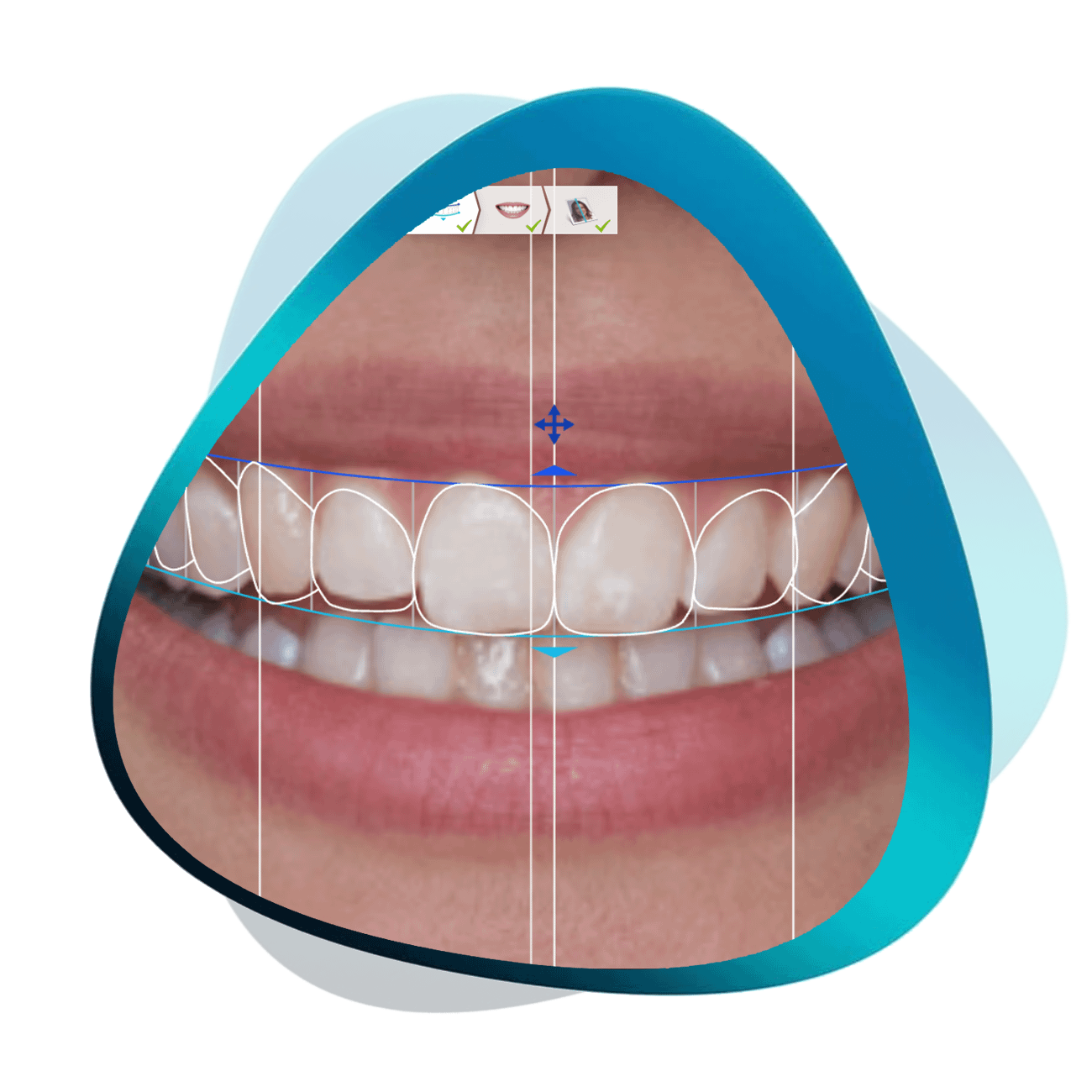
Show your patients the smile you are proposing before treatment starts. Learn Smile Design today!
Many dentists have misconceptions about Digital Smile Design. We've heard:

Software is too difficult to learn.
It will take way too long to understand.

I'm worried about learning something new.
I don’t see the value in adding Smile Design to my workflow.
Benefits of smile design
How Smile Design WILL Help My Dentistry:
Here’s what’s included:

8 COURSES
CPD/CE Hours: 10.5
A smile design on a photo shows the patient where you want to go. Dr. Paul Zhivago turns one into a 3D wax-up on the patient's scan in ZBrush and sets it up to print for a mock-up. Three lessons, about 50 minutes, 1.5 CPD/CE hours.
Learn from a prosthodontist how to use 2D and 3D smile design tools for your smile makeovers and full-mouth rehabilitation cases. With Dr. Paul Zhivago, a Clinical Associate Professor at the Department of Prosthodontics at New York University.
- Learn how to convert 2D smile designs to a 3D functional wax-up.
- Take the next steps and understand how to utilize smile design in your practice.
- Use these tools for patient communication and treatment planning.
- Learn from an experienced board-certified prosthodontist at New York University.
Learn how to create a Digital Smile Design in five steps, and use it to communicate with your patients and your lab.
- Understand smile parameters and how to use them.
- Learn about various types of DSD.
- Use DSD to discuss treatments and manage expectations.
- See it used in three case presentations, including a gummy smile treatment.
- Learn how to create a mock-up using exocad Smile Creator.
Learn the fundamental principles of Smile Design. We cover the different DSD software options available and compare the simulations of each, as you learn the entire workflow.
- Learn what Smile Design is and how to do it.
- Understand the difference between the various smile design applications.
- Real-life comparisons of Digital Smile Design, 3Shape Smile Design and Smile Designer Pro applications.
- Step by step comprehensive walkthrough.
- Understand how Smile Design ties in with 3D Printing and Cosmetic Digital Flows.
In this course we go over the key tips and tricks when designing an anterior crown. exocad software is used but these principles can be applied to any CAD software.
Learn about the 3D sculpting software called ZBrush, and how it can be applied for dental purposes in this introductory lecture with Dr Paul Zhivago.
Harness digital dentistry to its full potential! In this case study we will go over a digitally planned surgical crown lengthening case from start to finish. This includes smile design, 3D Printing, Surgical Guides, and an in-house smile makeover.
Learn about the fundamentals of 3D printing and how to implement it in your daily practice. Experienced prosthodontist Dr Michael Scherer goes over clinical applications and pros and cons of common printers on the market.
Sample the Course Content Below!
Get unlimited access to eight digital smile design online courses, complete with many tips and tricks from an experienced dental technician and expert.
With lifetime access, you can revisit the course whenever you need at your own pace.
These courses are available with English subtitles.
If you’re doing ANY cosmetic cases at all, Smile Design is a tool you can’t afford to neglect.
Who would benefit from learning Smile Design?
Our Digital Smile Design Bundle teaches you to plan cosmetic cases from the face and smile, and to show your patients the plan before you start, so you can present cosmetic cases with confidence.
Digital Smile Design
Online Course Bundle
$497 USD
Smile Design helped me significantly improve case acceptance and satisfaction of my patients with the final delivery of the restorations.
Dr Ahmad Al-Hassiny
Digital Dentist and CAD/CAM Educator
Before I was proficient in Smile Design, I would often struggle to close cosmetic cases. I would have a patient who was in dire need of some cosmetic work, but I wasn’t able to effectively communicate the treatment outcomes to them.
Or if they did accept my treatment, they would have unrealistic expectations of what could be achieved - and would often be disappointed at the final result. I would then have to redo their dentures or temporaries, which ultimately wasted my time and cost my clinic money.
Frustrated with my situation, I decided to learn more about Smile Design software. Medit’s Smile Design tool was a great starting point, as it was completely free.
I became confident using the software and noticed some impressive changes to my dentistry:
Much higher case acceptance rate.
Much more confident in carrying out cosmetic cases.
Improved patient outcomes and happiness.
Significantly less re-dos.
Learning Smile Design has made me a much better dentist overall. When I treatment plan, I consider the entire face and smile and how everything works together.
The greatest thing about Smile Design is that once you learn the fundamentals, you can use all the different softwares - from free to premium.
